You’re using Claude wrong. Here’s the fix.

Most people use Claude like a search engine.
They open it. Ask a question. Get an answer. Close the tab.
Then they come back the next day and start from scratch like nothing ever happened.
I talk to entrepreneurs every week who tell me Claude isn't that useful. They tried it, got some decent answers, and moved on.
And every time, I ask the same question: Did you set it up?
They look at me like I asked if they read the manual before driving. Nobody does that.
But with Claude, the setup isn't optional. It's the whole difference between a tool you dabble with and one that actually works for your business.
I'm not talking about learning a bunch of technical tricks. I'm talking about 5 things that take maybe 20 minutes total.
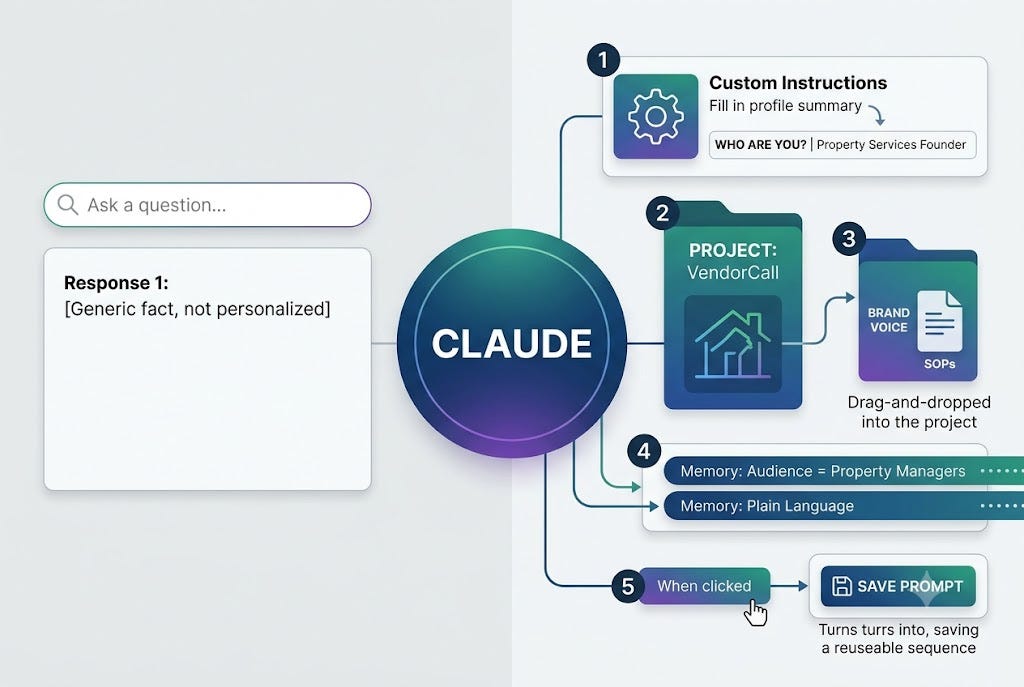
Step 1: Write your Custom Instructions.
Go to Settings. Find Custom Instructions. Write a short paragraph about who you are, what you do, and how you want Claude to communicate with you.
Mine tells Claude I run a property services platform, I write for entrepreneurs and small business owners, and I want plain language — no corporate speak, no long explanations.
That one paragraph changes every response you get. Leave it blank and you're starting from scratch every session.
Step 2: Create a Project.
Projects are dedicated workspaces inside Claude. Think of it like a folder that has its own memory and context. I have one for VendorCall, one for content, one for Get AI Fluent.
When you're working inside a Project, Claude knows what it's for. You stop re-explaining your business every time you open the app.
Step 3: Add reference files to your Project.
Inside your Project, you can upload documents — your style guide, your offer details, your most common SOPs, a sample of your own writing. Now Claude can reference your actual stuff.
I uploaded my brand voice guide. Now when I ask Claude to help me write content, it sounds like me instead of a LinkedIn bot.
Step 4: Tell Claude what to remember.
During your conversations, be intentional. "Remember that I prefer short emails." "Remember that my audience is property managers, not tech people." "Remember I never use the word leverage."
This builds over time. A month from now, Claude knows how you work without you having to explain it.
Step 5: Build a prompt you can reuse.
Every time you get a response that nails it — save that prompt. Drop it in a notes doc. That becomes your starting point next time instead of figuring it out from scratch again.
I have about 10 prompts I use on rotation. Newsletter draft. Content repurpose. Vendor email template. Each one took some tuning to get right. Now they just work.
That's it. Five things.
The people getting the most out of AI right now aren't smarter or more technical than you. They're just more intentional about the setup.
If you want plug-and-play prompts to accelerate that process, I put together a free resource called PromptPath — tested prompts you can start using today. Grab it here →
More on this next issue.
— JT